
Download Air Printer – Free Wireless Printing for Windows, Mac, iOS & Android
Air Printer by Flyingbee is a powerful, secure, and easy-to-use wireless printing solution that brings Apple’s AirPrint functionality to Windows and other devices. Whether you're printing from your iPhone, iPad, Android phone, or PC, Air Printer eliminates the need for cables, drivers, or complex setups. With support for HP, Canon, Epson, Brother, and other major printers, this free software delivers seamless, on-the-go printing.
Enjoy hassle-free document, photo, and email printing directly from your mobile device to any compatible printer, all via Wi-Fi. No extra apps required—just download, install, and print. Perfect for home offices, students, and small businesses seeking a reliable, affordable, and future-ready printing tool.
Seamless Wireless Printing Across Devices
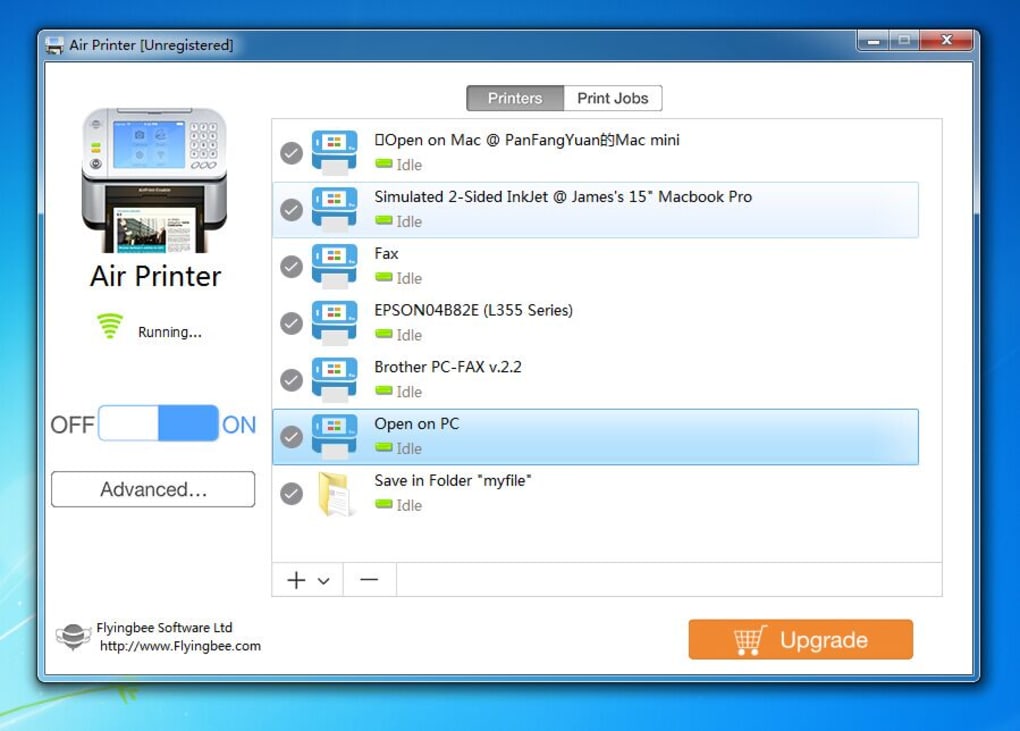
Air Printer revolutionizes the way you print by bringing AirPrint-like convenience to non-Apple devices—especially Windows users. Traditionally, AirPrint has been exclusive to Apple ecosystems, leaving Windows and Android users without the same effortless printing experience. With Air Printer, that gap is closed. Once installed, the software enables your Windows PC to act as a bridge between your iPhone, iPad, iPod, Android phone, or tablet and any compatible printer on your network. Simply open a document, email, or photo on your mobile device, tap the share button, and select your printer from the AirPrint menu—no cables, no drivers, no hassle. The software works over Wi-Fi, ensuring fast and stable connections. It automatically detects available printers on the same network, making setup a breeze. You don’t need to manually configure IP addresses or install printer-specific software. Air Printer supports a wide range of printers, including HP, Canon, Epson, and Brother models, making it a versatile tool for both home and office use. Whether you're printing a school assignment, a business report, or a family photo, the process is instant and intuitive. One of the standout features is its file conversion capability. While printing, you can convert documents like Word files into PDFs directly through the software. This is incredibly useful for sharing standardized documents or archiving files in a universally readable format. The interface is clean and minimal, with clearly labeled buttons for "Printers," "Print Jobs," and "Advanced Settings." The "On/Off" toggle ensures you can disable the service when not in use, saving system resources.Easy Installation & Smart Usage Features
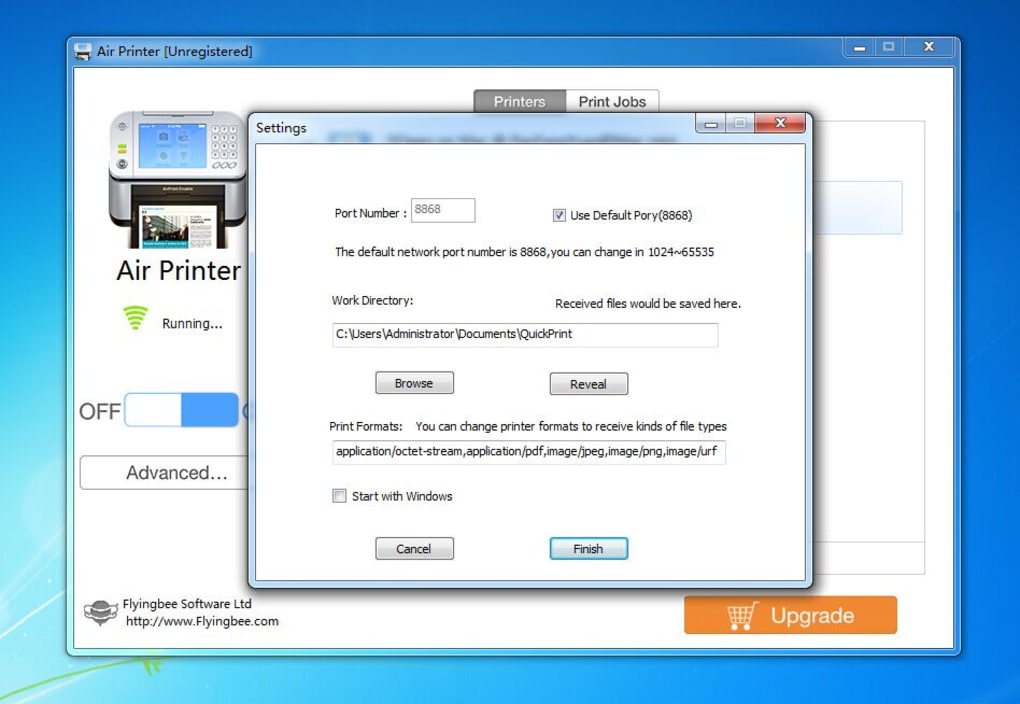
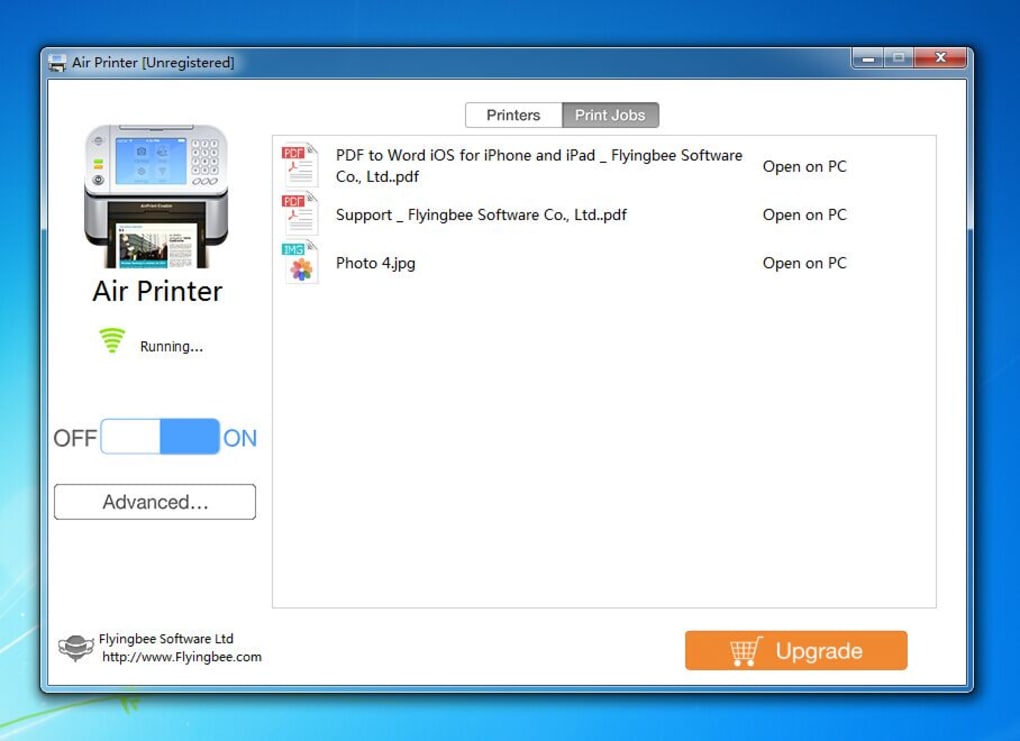
Getting started with Air Printer is quick and straightforward. Download the software from the official Flyingbee website—no registration or hidden fees. The installer is lightweight and runs smoothly on Windows 7 through Windows 11. After downloading, double-click the file and follow the on-screen instructions. The entire installation process takes less than two minutes, even on older systems. Once installed, the main window opens with a user-friendly layout. The top panel features two primary buttons: "Printers" and "Print Jobs." The "Printers" section lets you manage which printers are connected and active. You can add, remove, or prioritize devices based on your needs. The "Print Jobs" tab displays a history of all recent print tasks, including timestamps and file types, which is helpful for tracking or reprinting documents. The real magic happens in the "Advanced Settings" menu. Here, you can customize the software to suit your workflow. You can set preferred file formats for incoming documents, filter which file types are accepted (e.g., PDF, DOCX, JPEG), and even enable automatic file conversion. For example, if you frequently print Word documents, you can set them to convert to PDF before printing—ideal for consistent formatting. Another smart feature is the ability to view files before printing. When a file is sent from your mobile device, you can preview it directly in the Air Printer interface before confirming the print job. This helps prevent errors and wasted paper. The software also runs quietly in the background, consuming minimal CPU and memory, so it won’t slow down your system during heavy use.Compatibility & Security for Every User
Air Printer is designed with broad compatibility in mind. It supports Windows 7, 8, 10, and 11, making it accessible to the vast majority of PC users. While the software is primarily built for Windows, its core functionality—wireless printing over Wi-Fi—can be accessed from iOS and Android devices without needing to install any additional apps. This cross-platform flexibility is a major advantage for mixed-device households or small teams. The software is also compatible with a wide range of printers from leading brands. Whether you're using an HP LaserJet, Canon PIXMA, Epson EcoTank, or Brother HL series, Air Printer handles them with ease. It works with both USB and network-connected printers, so you’re not limited by your hardware setup. Security is a top priority. Air Printer doesn’t require you to open firewall ports or expose your printer to the internet. All communication happens locally over your private Wi-Fi network, ensuring your data stays protected. There’s no need to share login credentials or store files on remote servers. The software uses standard network protocols and doesn’t collect user data, making it a trusted choice for privacy-conscious users. For small businesses and home users, this combination of compatibility, security, and ease of use makes Air Printer a standout option. It’s ideal for users who want a reliable, free alternative to paid printing services like Google Cloud Print (now discontinued) or PrinterShare. With no subscription fees and no in-app purchases, Air Printer remains fully free to download and use.Pros & Cons Summary
- Pros: Free to download and use, supports multiple platforms (Windows, iOS, Android), no extra apps needed, automatic file conversion, secure local printing, easy setup, compatible with major printer brands.
- Cons: Limited to Windows (no native Mac version available), no cloud backup feature, no built-in print queue management, requires both devices and printer to be on the same Wi-Fi network.
Frequently Asked Questions (FAQ)
- Is Air Printer free to download and use?
Yes. Air Printer is completely free to download and use with no hidden fees, subscriptions, or in-app purchases. It’s ideal for individuals, students, and small businesses looking for an affordable printing solution.
- Can I use Air Printer with my Android phone?
Yes. Air Printer works seamlessly with Android devices. Simply ensure your phone and PC are on the same Wi-Fi network, and you can print directly from any app using the share menu.
- Does Air Printer support Mac computers?
Not natively. Air Printer is currently only available for Windows. However, Mac users can still print wirelessly using Apple’s built-in AirPrint, which is compatible with most modern printers.
- Can I convert files to PDF while printing?
Yes. One of the key features of Air Printer is the ability to convert files like Word documents into PDF format during the print process. This is configurable in the Advanced Settings menu.
- Do I need to install anything on my iPhone or iPad?
No. You don’t need to install any app on your Apple device. Air Printer automatically appears in the AirPrint menu when your iPhone, iPad, or iPod is on the same Wi-Fi network as your Windows PC.
- Is Air Printer secure?
Yes. Air Printer uses local Wi-Fi communication and does not send data to external servers. All printing occurs within your private network, ensuring your files remain private and secure.







